Pallet Height Violation
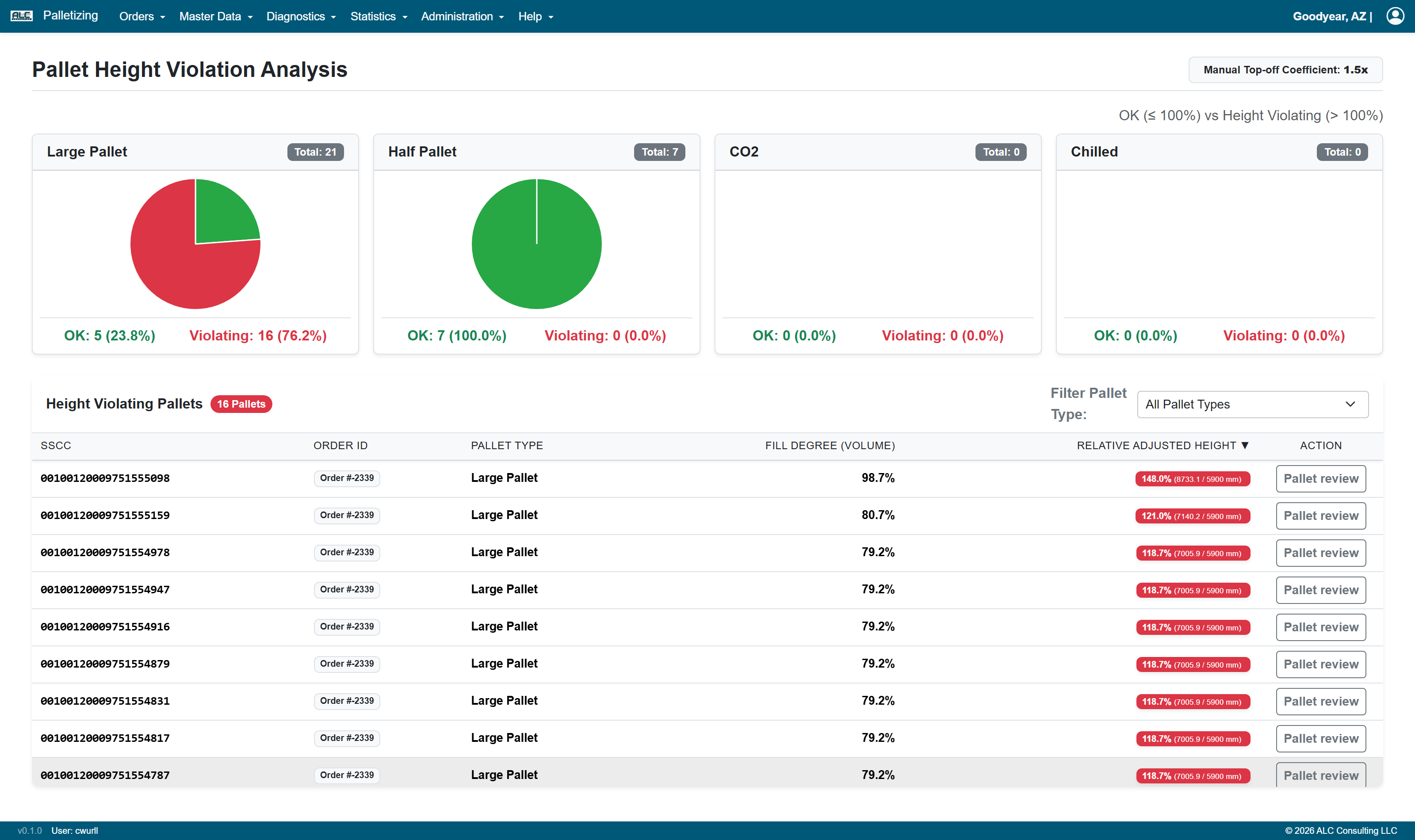
The Pallet Height Violation page (menu Diagnostics → Pallet Height Violation) analyses all calculated pallets with respect to the maximum permitted loading height of their pallet type. It shows how many pallets of each pallet type exceed that height and lists the affected pallets.
Calculation of the Relative Adjusted Height
The height of a pallet is determined in two parts:
- For all machine built (non-manual) layers, the physical layer heights are added up.
- For the manual layers, no exact height is known. Their volume is multiplied by the Manual Top-off Coefficient and divided by the pallet base area, which yields a substitute height for the manual top off.
The sum of both parts is set in relation to the Load Height of the pallet type (see Pallet Types Master):
Relative Adjusted Height = (height of the machine layers + height of the manual top off) / Load Height
A pallet is regarded as height violating if this value is greater than 100 %.
The Manual Top-off Coefficient is displayed in the page header. It is taken from the setting
coefficient_volume_of_manual_item_increase on the Settings page; if the setting is
missing or invalid, the value 1.5 is used.
Note: If a pallet type has no length, width or load height maintained, a substitute pallet of 1200 × 800 × 1800 mm is used for the evaluation.
Statistics per Pallet Type
The upper part of the page shows one pie chart per pallet type with the split between
- OK (≤ 100 %) — green
- Violating (> 100 %) — red
The total number of evaluated pallets of the pallet type is displayed in the chart header, the absolute numbers and the percentages below the chart.
Height Violating Pallets
The table lists all pallets whose relative adjusted height is greater than 100 %. The badge in the table header shows the number of listed pallets.
| Column | Description |
|---|---|
| SSCC | SSCC of the pallet (or PAL-<pallet number> if no SSCC is assigned) |
| Order ID | Order the pallet belongs to |
| Pallet Type | Pallet type of the pallet |
| Fill Degree (Volume) | Volume of all packages in relation to the available pallet volume |
| Relative Adjusted Height | Height utilization in percent, with the calculated height and the permitted load height in mm |
| Action | Pallet review opens the affected pallet in a new tab on the Pallet Review page |
- Filter Pallet Type restricts the table to a single pallet type. The number of violating pallets is shown in brackets for each entry of the dropdown.
- All columns except Action can be sorted by clicking the column header. By default the table is sorted by descending relative adjusted height.
- Clicking a row opens the interactive 3D visualization of the pallet below the table.